
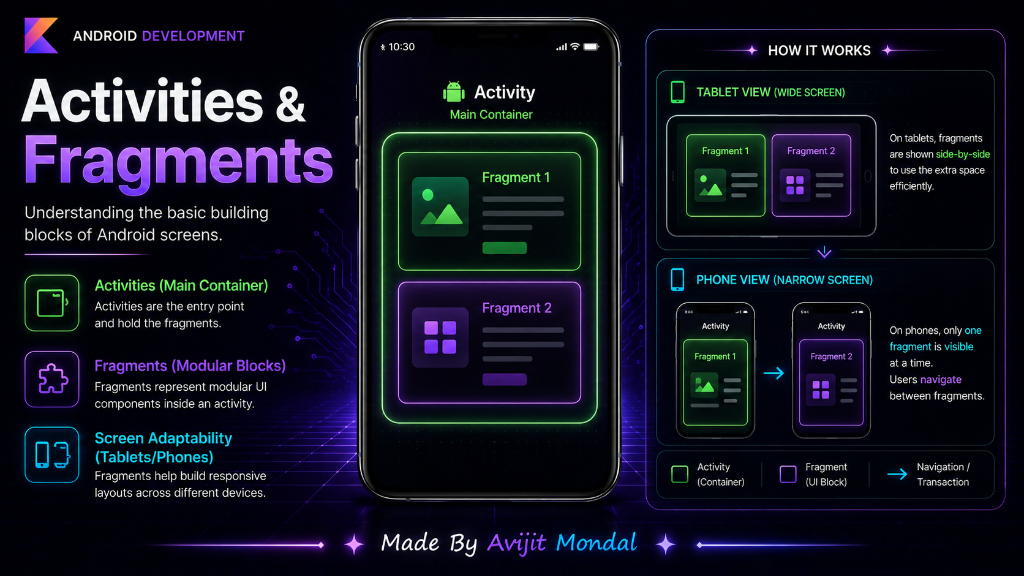
Introduction: When you open an Android app, you see screens, tabs, and menus. But how are these screens built under the hood? In Android development, screens are organized using two core building blocks: Activities and Fragments. Let's learn what they are and why we need both using a simple design analogy.
The Analogy: Picture Frame and Drawings
Imagine you want to decorate your living room wall:
1. The Activity (The Picture Frame)
An **Activity** is a large, physical picture frame hanging on the wall. It represents a single screen with a user interface. Without a frame, you cannot hang any drawings on your wall. In Android, the Activity is the window container that fills your phone's screen.
2. The Fragment (The Drawings Inside)
A **Fragment** is a drawing or photo that you place *inside* the picture frame. You can place one giant drawing inside, or you can split the frame and place three smaller drawings side-by-side. A Fragment is a modular, reusable piece of a screen that must live inside an Activity.
Why Do We Need Fragments?
In the early days of Android, there were only Activities. But as tablets and foldable phones became popular, screens got much larger. Developers needed a way to build modular UIs. Here is why Fragments are useful:
- Tablet Support (Multi-Pane layouts): On a phone screen, you show a list of chats (Fragment A) on one screen. Tapping a chat opens a new screen with messages (Fragment B). On a tablet, you can fit both. You place Fragment A on the left and Fragment B on the right inside **one single Activity**!
- Reusability: You can create a 'Profile Details' Fragment once, and show it inside the main feed screen, a settings tab, or a popup modal without rewriting any code.
Activities vs. Fragments
To help you decide how to build your next screen, use this comparison table:
| Feature | Activity (Main Frame) | Fragment (Modular Piece) |
|---|---|---|
| Can it run alone? | ✅ Yes | ❌ No (needs a host Activity) |
| Manifest Registration | ✅ Required (must be listed in AndroidManifest.xml) | ❌ No registration needed |
| Screen Space | Fills the entire device screen | Can fill the screen or just a small section |
| Lifecycle dependency | Independent (managed by the OS) | Dependent (dies when host Activity dies) |
| Usage frequency | Usually 1 main Activity per app (in modern apps) | Multiple Fragments representing different sub-screens |
Summary
Activities are the main windows of your Android app, while Fragments are modular sub-screens that live inside them. Activities handle the main window container and system registration, and Fragments make it easy to reuse layouts and support larger screens like tablets. Knowing how they work together is a key step to designing flexible, clean Android interfaces!