
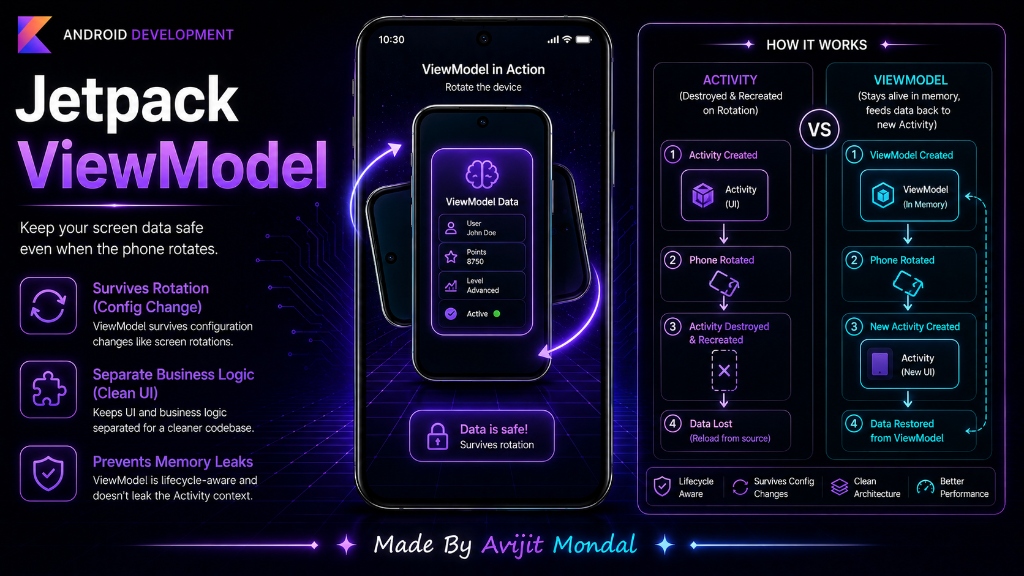
Introduction: When building an Android app, you might notice a strange bug. You type text into a form or increase a counter, but when you rotate your phone sideways, all the data disappears and the screen resets! In Android development, Google created the ViewModel to solve this exact problem. Today, we will learn how it keeps your data safe.
The Problem: Screen Rotation Recreates the Screen
In Android, rotating your device is called a **Configuration Change**. When it happens, Android completely destroys the active screen (Activity) and builds a brand new one from scratch. It does this so it can load new layouts or fonts suited for landscape mode.
If you save your variables (like lists, text inputs, or loading status) directly inside your Activity class, they are wiped out when the Activity is destroyed. To prevent this, we need a separate place to hold data.
The Analogy: The Backpack vs. Pockets
Imagine sitting in a chair. If you keep your coins in your **pockets** (the Activity) and the chair suddenly spins and flips over (rotation), your coins will fall out and roll away. You lose them.
Instead, imagine you put your coins in a **backpack** (the ViewModel) placed on the table next to you. Even if the chair flips over and is replaced by a new chair, your backpack stays on the table. When you sit in the new chair, you pick up your backpack and your coins are safe!
How to Use ViewModel in Kotlin Code
Let's build a simple counter screen that keeps track of clicks and survives rotation.
Step 1: Create the ViewModel
We create a class extending ViewModel and store our counter variable there:
import androidx.lifecycle.ViewModel

class CounterViewModel : ViewModel() {
    // This data stays safe when the screen rotates!
    var clickCount = 0

    fun incrementCounter() {
        clickCount++
    }
}
Step 2: Connect it to the Activity
We fetch the ViewModel in our Activity using the viewModels() helper. Now, we use the variables from the ViewModel instead of local activity variables:
import android.os.Bundle
import androidx.activity.viewModels
import androidx.appcompat.app.AppCompatActivity
import kotlinx.android.synthetic.main.activity_main.*

class MainActivity : AppCompatActivity() {

    // Get the ViewModel connected to this Activity's lifecycle
    private val viewModel: CounterViewModel by viewModels()

    override func onCreate(savedInstanceState: Bundle?) {
        super.onCreate(savedInstanceState)
        setContentView(R.layout.activity_main)

        // 1. Display the count (initially 0, or loaded value if rotated)
        counterTextView.text = "Clicks: ${viewModel.clickCount}"

        // 2. Increment count on click
        clickButton.setOnClickListener {
            viewModel.incrementCounter()
            counterTextView.text = "Clicks: ${viewModel.clickCount}"
        }
    }
}TextView, Button) or Context references (like Activity) inside a ViewModel. Because ViewModels outlive Activities, holding a reference to a destroyed view will leak memory and crash your app!Data Storage Options in Android
Here is a comparison of how you can save data during configuration changes:
| Method | Survives Rotation? | Survives App Kill? | Best For |
|---|---|---|---|
| Activity Variable | ❌ No | ❌ No | Temporary view calculations. |
| ViewModel | ✅ Yes | ❌ No | Active screen state, network lists, loaded tables. |
| SavedStateHandle | ✅ Yes | ✅ Yes (Restores state) | Small pieces of critical info (like active user ID). |
| Room Database | ✅ Yes | ✅ Yes | Permanent offline data. |
Summary
Android ViewModels are designed to store and manage UI-related data so it survives configuration changes like screen rotations. By writing a class extending ViewModel and linking it to your Activity, you keep data safe without writing complex save-state code. Just remember: keep context and view references out of your ViewModels!