Introduction: If you use an iPhone, you have probably heard about Apple Intelligence. It is Apple's new artificial intelligence system built directly into iOS. Unlike normal AI chatbots that live on websites, Apple Intelligence is woven inside your daily apps. Today, we will explore how it works and how it changes your phone experience, explained in simple words.
The Analogy: The Smart Personal Assistant
To understand why Apple Intelligence is different from other AI tools, think of this comparison:
- Standard Web AI (The Smart Professor): Tools like ChatGPT are like a smart professor who knows everything on the internet. But the professor does not know who you are, what your mom's name is, or when your flight lands. You have to type all details manually.
- Apple Intelligence (The Personal Secretary): This system is like a secretary who lives inside your office. The secretary has access to your emails, calendar, messages, and photos. It has personal context.
Because it has personal context, you can ask Siri: 'Play the video link my brother sent me yesterday.' Siri does not search Google—it opens your Messages app, finds your brother's chat, extracts the link, and plays it instantly!
How Does It Work? (And What About Privacy?)
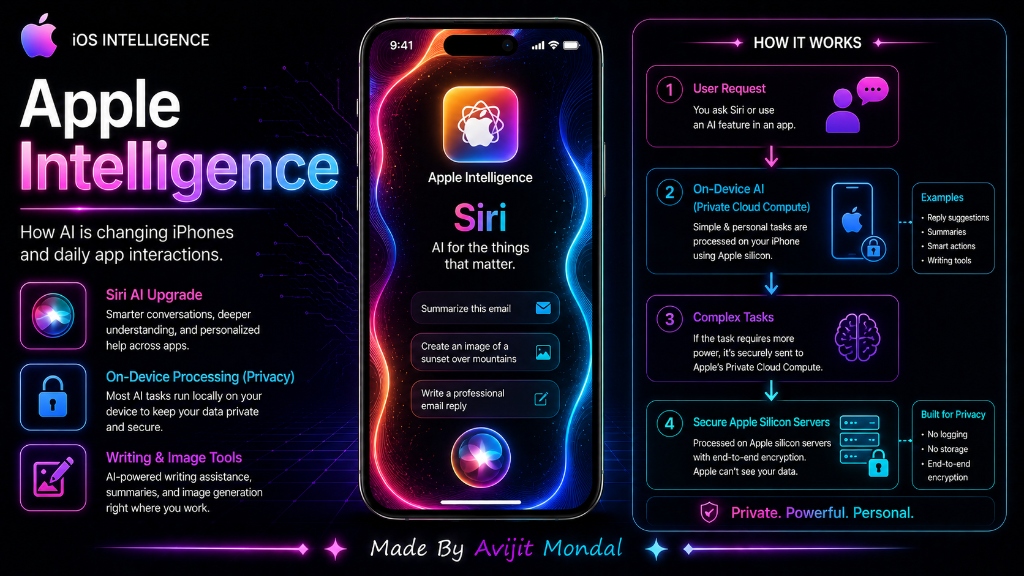
When you use AI on a website, your text is sent to massive servers where it can be stored or analyzed. To keep your private data safe, Apple splits the work into two secure channels:
1. On-Device AI (The Sealed Phone)
Most simple requests—like summarizing notification lists, proofreading emails, or suggesting quick replies—run directly on your iPhone's physical processor chip (Apple Silicon NPU). Your private data never leaves your hand.
2. Private Cloud Compute (The Locked Vault)
If a task requires too much processing power (like generating a custom image), your phone sends the request to Apple's secure cloud servers. These servers process the request, return the answer, and immediately delete your data. Apple does not log your files, and no one else can read them.
Key Features of Apple Intelligence
Here are the coolest new tools you can use on your iPhone:
- Siri Upgrade: Siri understands natural speech better. If you stutter (e.g. 'Siri, set timer for, no wait, alarm for 7 AM'), Siri corrects it on the fly. Siri also has a glowing rainbow border around the screen.
- Writing Tools: Instantly rewrite emails or texts in different tones (make it sound Professional or Friendly), or summarize a long article into three bullet points.
- Genmoji & Image Tools: Type 'T-Rex wearing a party hat' and your phone will generate a custom emoji to send in chat.
Normal Cloud AI vs. Apple Intelligence
Compare how these systems stack up in this simple table:
| Feature | Standard Web AI (ChatGPT, etc.) | Apple Intelligence |
|---|---|---|
| Where does it run? | Large internet servers (Cloud) | Mostly on your device, private servers for heavy tasks |
| Personal Context | ❌ No (cannot read your notifications/emails) | ✅ Yes (understands your app data safely) |
| Data Privacy | Data is sent to public servers and logged | ✅ Secure (on-device or encrypted cloud compute) |
| Built-in Apps | Requires separate apps/browsers | ✅ Integrated inside Messages, Mail, Photos, Siri |
Summary
Apple Intelligence brings AI inside your daily iPhone apps. By combining local on-device processing with secure Private Cloud Compute, it understands your personal context (like email details or message photos) without sharing your private data with public servers. It is the future of smart, private mobile assistants!