
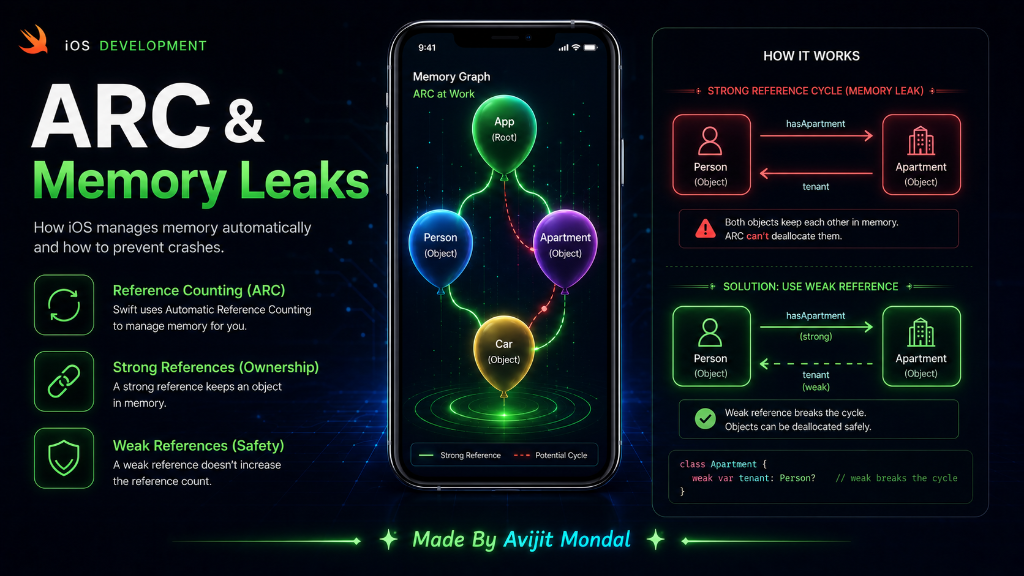
Introduction: Every app uses the phone's memory (RAM) to store variables, images, and screens. If an app uses too much memory, the iPhone will shut it down. In Swift, memory is managed automatically by a system called ARC (Automatic Reference Counting). Today, we will learn how it works and how to prevent memory leaks using a simple story.
The Analogy: Balloons and Strings
Imagine a class object (like a User profile) is a **balloon** floating in a room. To keep it from floating away, you tie a string to it. This string is a Strong Reference.
- If you tie one string to the balloon, the **Reference Count is 1**. The balloon stays.
- If a friend also ties a string to it, the **Reference Count is 2**.
- If you cut your string, the count drops to 1. The balloon is still there.
- If your friend also cuts their string, the count drops to **0**. The balloon floats away and is cleaned up (this is called **Deinitialization**).
ARC is the manager that counts these strings. It keeps the balloon as long as the count is 1 or more. When the count hits 0, ARC pops the balloon to free up memory.
The Trap: Strong Reference Cycles (Memory Leaks)
Sometimes, two balloons tie strings to **each other**. This creates a trap. Imagine two classes:
class Person {
    var name: String
    var apartment: Apartment?

    init(name: String) {
        self.name = name
    }
    deinit {
        print("\(name) is leaving memory!")
    }
}

class Apartment {
    var unit: String
    var tenant: Person?

    init(unit: String) {
        self.unit = unit
    }
    deinit {
        print("Apartment \(unit) is empty!")
    }
}
Let's create a Person named Alex and an Apartment 101. Then, we link them:
var alex: Person? = Person(name: "Alex") // Person count = 1
var room101: Apartment? = Apartment(unit: "101") // Apartment count = 1

// Link them together
alex?.apartment = room101   // Apartment count becomes 2 (Alex holds a string to it)
room101?.tenant = alex      // Person count becomes 2 (Room 101 holds a string to it)
Now, imagine Alex leaves the app, so we set the variables to nil:
alex = nil      // Person count drops from 2 to 1 (linked by Apartment)
room101 = nil   // Apartment count drops from 2 to 1 (linked by Person)
Because the count is still 1 for both, ARC **cannot** clean them up! The objects are invisible to the user, but they are stuck in memory forever. This is called a **Memory Leak**.
The Fix: Weak References
To break this cycle, we use the weak keyword. A weak string holds the balloon but does **not** increase the reference count. It is like looking at the balloon instead of tying a physical string to it.
class Apartment {
    var unit: String
    // By adding 'weak', this connection does not increase the count!
    weak var tenant: Person?

    init(unit: String) {
        self.unit = unit
    }
}
Now, when we set alex = nil, the Person count drops to 0 immediately. The Person balloon pops, which cuts the link to the Apartment, causing the Apartment balloon to pop too. Both are cleaned up safely!
weak. Also, when using self inside closures (blocks of code), use [weak self] to prevent locking the View Controller in memory.Reference Types Comparison
Here is a quick cheat sheet on the three reference types in Swift:
| Type | Does it increase count? | Can it be nil? | When to use |
|---|---|---|---|
| strong (Default) | ✅ Yes | ✅ Yes | Standard ownership (parent owning a child). |
| weak | ❌ No | ✅ Yes (Must be optional) | Delegates, child-to-parent links to avoid leaks. |
| unowned | ❌ No | ❌ No (Will crash if nil) | When you are 100% sure the object outlives the link. |
Summary
ARC automatically manages memory by counting strong links (strings) to objects (balloons). If two objects point to each other strongly, they leak memory. By marking one side of the relationship as weak, you prevent cycles and keep your app light and fast. Remember to use weak for delegates and [weak self] in closures!