
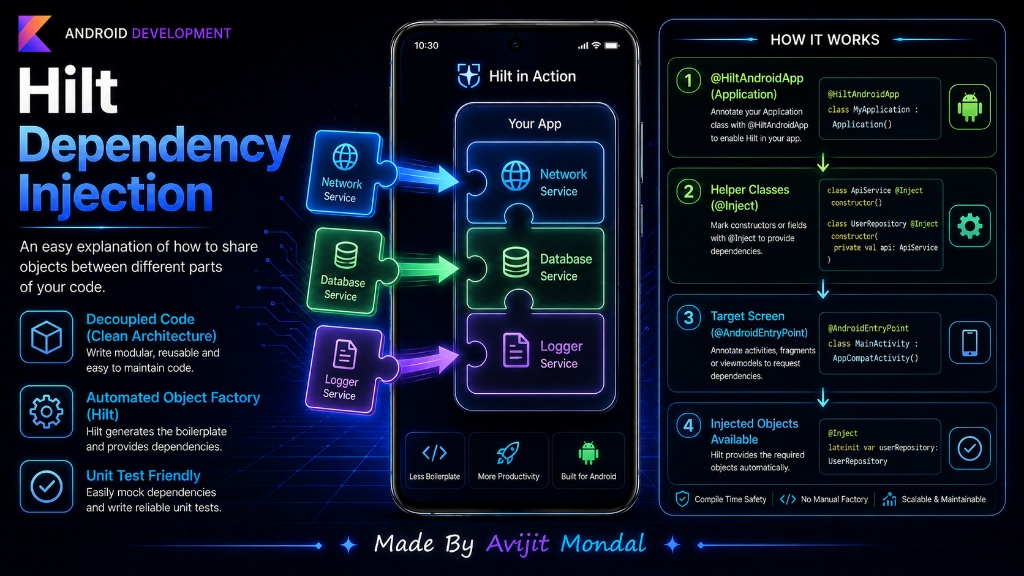
Introduction: As you build larger Android apps, you will notice that different classes need to work together. A View Controller might need a database class, which needs a network class, which needs a configuration class. Creating all these objects manually inside your screen code makes your project messy and hard to test. This is where Dependency Injection (DI) and Google's library Hilt come to help.
The Analogy: The Pizza Maker
Imagine you are running a pizza restaurant and hire a chef (the PizzaMaker class). To bake a pizza, the chef needs an **Oven**, **Cheese**, and **Dough**.
Without Dependency Injection (Hardcoded)
Before starting, the chef has to build a brick oven from scratch, buy a cow to make cheese, and grind wheat to make dough. The chef is doing too many things! If the oven breaks, the chef cannot make pizza because the oven is hard-built inside the kitchen.
With Dependency Injection (Passed in)
The chef simply says: 'I just need an Oven, Cheese, and Dough. Someone please hand them to me.' The restaurant manager buys the oven, gets the ingredients from a store, and **hands (injects)** them to the chef. Now, the chef can focus 100% on baking pizza.
What is Google Hilt?
Hilt is Google's official library that acts as the automated helper factory. It automatically creates, stores, and injects classes into your Activities and viewmodels so you don't have to write any 'new object' boilerplate code!
Hilt in Action: Injecting a Service
Here is a simple example showing how Hilt creates and injects an analytics logger into an Activity screen.
Step 1: Mark the class to be constructed
We tell Hilt how to make the LoggerService using the @Inject annotation:
import javax.inject.Inject

class LoggerService @Inject constructor() {
    fun logEvent(message: String) {
        println("[Log]: $message")
    }
}
Step 2: Inject it into the Activity
We mark our Activity with @AndroidEntryPoint to tell Hilt: 'Put dependencies here.' Then, we request the logger using @Inject lateinit var:
import android.os.Bundle
import androidx.appcompat.app.AppCompatActivity
import dagger.hilt.android.AndroidEntryPoint
import javax.inject.Inject

@AndroidEntryPoint // Tells Hilt to handle injection for this Activity
class MainActivity : AppCompatActivity() {

    // Hilt will construct and assign this variable automatically!
    @Inject lateinit var logger: LoggerService

    override fun onCreate(savedInstanceState: Bundle?) {
        super.onCreate(savedInstanceState)
        setContentView(R.layout.activity_main)

        // Use the injected helper directly!
        logger.logEvent("MainActivity loaded successfully")
    }
}Dependency Injection Methods compared
Here is a comparison of how you can handle dependency creation in your apps:
| Method | Boilerplate Code | Type Safety | Recommended For |
|---|---|---|---|
| Manual Injection | High (You must write factories by hand) | ✅ High | Small educational projects. |
| Dagger 2 | Medium (requires complex setup classes) | ✅ High | Massive legacy projects (hard to learn). |
| Hilt (Google) | Low (Automated annotations) | ✅ High (checked at compile time) | All new Android apps in 2026. |
Summary
Dependency Injection means passing tools (dependencies) into a class from the outside instead of constructing them inside. Google Hilt simplifies this in Android by constructing and passing these objects automatically using annotations like @Inject and @AndroidEntryPoint. Adopt Hilt to write clean, decoupled, and easy-to-test Android apps!