
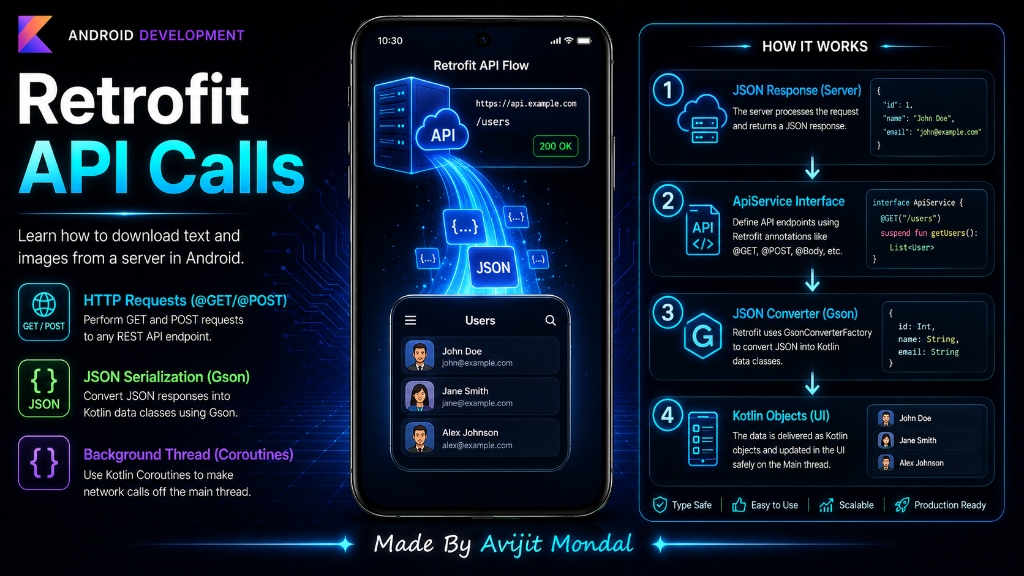
Introduction: Almost every Android app you use—like Spotify, Instagram, or YouTube—needs to load data from a server over the internet. In Android development, the most popular and professional tool for making these network requests is Retrofit. In this guide, we will learn how to use Retrofit to fetch data and load it into Kotlin objects using very simple steps.
The Analogy: The Telephone Secretary
In the old days of Android, making a network call was like manually running cables and dialing the chef directly. You had to open sockets, manage byte buffers, and parse raw string text. It took dozens of lines of code and was highly error-prone.
Retrofit acts like a **private telephone secretary**. You do not handle the phone lines or network sockets yourself. You just write a simple Kotlin interface (like a list of instructions): 'Hey, call the server and fetch the users list.' Retrofit dials the number, downloads the JSON text, translates it into Kotlin objects, and hands it back to you! It has three main parts:
- 1. Data Model (The Template): A data class matching the JSON structure from the server.
- 2. API Interface (The Menu Card): An interface that lists the URL endpoints using annotations (like
@GETor@POST). - 3. Retrofit Builder (The Connection Setup): Configures the server's base URL and the JSON-to-Kotlin translation engine (called a **Converter**).
How to Use Retrofit in Code
Let's build a simple network request to load a list of posts from a server.
Step 1: Create the Data Model
If the server sends a list of JSON posts, we create a Kotlin class that matches those keys exactly:
data class Post(
    val userId: Int,
    val id: Int,
    val title: String,
    val body: String
)
Step 2: Define the API Interface
We write an interface listing the endpoints. We mark functions as suspend because downloading data takes time and must run in the background (using Coroutines).
import retrofit2.http.GET

interface ApiService {
    // Tells Retrofit to make a GET request to "https://api.example.com/posts"
    @GET("posts")
    suspend fun getPosts(): List<Post>
}
Step 3: Create the Retrofit Builder and Make the Call
We initialize Retrofit, tell it to translate JSON using the Gson Converter, and run our query:
import retrofit2.Retrofit
import retrofit2.converter.gson.GsonConverterFactory

fun loadNetworkData() {
    // 1. Setup the Retrofit instance
    val retrofit = Retrofit.Builder()
        .baseUrl("https://jsonplaceholder.typicode.com/") // Base website URL
        .addConverterFactory(GsonConverterFactory.create()) // Gson handles translation
        .build()

    // 2. Create the service interface
    val apiService = retrofit.create(ApiService::class.java)

    // 3. Make the call inside a Coroutine scope
    CoroutineScope(Dispatchers.Main).launch {
        try {
            val posts = apiService.getPosts() // Fetched in background!
            println("Successfully loaded ${posts.size} posts!")
        } catch (e: Exception) {
            println("Network error: ${e.localizedDescription}")
        }
    }
}AndroidManifest.xml file:<uses-permission android:name="android.permission.INTERNET" />Retrofit vs. Raw HttpURLConnection
To see why Retrofit is the industry standard, look at this comparison:
| Feature | Raw Connection (Old Way) | Retrofit (Modern Way) |
|---|---|---|
| Code size | Large (needs reader buffers and string parsing) | Extremely small (just interfaces & models) |
| JSON Parsing | Manual (JSONObjects / String splits) | Automatic (handled by Gson/Jackson converter) |
| Error Handling | Manual check of response codes | Catch exceptions directly in Coroutines |
| Thread safety | Requires manual thread switching | Supports Kotlin Coroutines naturally |
Summary
Retrofit is Android's premier network library. By setting up a model class matching the server JSON, writing an interface with request annotations (like @GET), and configuring a Retrofit Builder with a JSON converter, you can fetch internet data in a few lines of code. Just remember to add the INTERNET permission in your Manifest!