
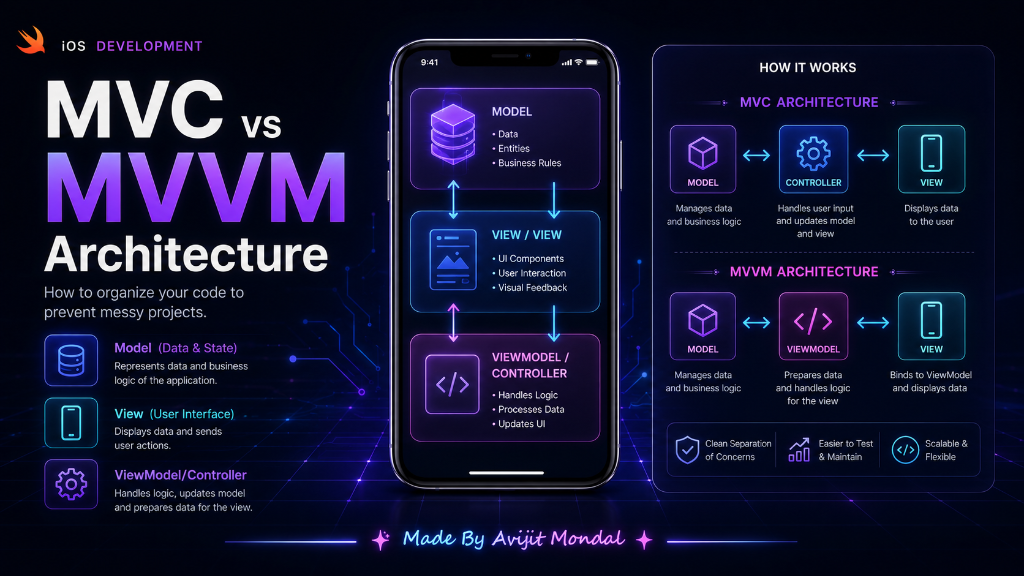
Introduction: When you start building apps, you might write all your code in one single file. At first, it works. But as your app grows, that file becomes a giant monster of 2,000 lines of code. Finding bugs becomes impossible. To prevent this, developers use Architecture Patterns. The two most famous in iOS are MVC and MVVM.
The Kitchen Analogy
Imagine a restaurant. If one single worker has to take the order, cook the steak, wash the dishes, and handle the cash registry, the restaurant will fail. It is too messy.
To run smoothly, the restaurant divides the work among specialized roles. App architecture does the exact same thing: it gives specific jobs to different parts of your code.
1. What is MVC? (Model-View-Controller)
MVC is Apple's classic design pattern. It divides your app into three groups:
- Model (The Food Ingredients): The raw data. For example, a struct representing a user:
struct User { let firstName: String; let lastName: String }. - View (The Plate): The visual UI elements the user sees (labels, buttons, sliders). It does not know where the data comes from.
- Controller (The Waiter): The coordinator (represented by
UIViewController). It takes data from the Model, formats it (like combining first and last name), and tells the View to display it. It also listens to user taps on the View and updates the Model.
2. What is MVVM? (Model-View-ViewModel)
To solve the MVC mess, developers created **MVVM**. It is the standard pattern for modern SwiftUI apps. It replaces the Controller with a new assistant called the **ViewModel**:
- Model: Same as before, just raw data.
- View: The layout (in SwiftUI, a View struct; in UIKit, UIView/UIViewController). It is passive and dumb.
- ViewModel (The Kitchen Translator): The coordinator. It takes raw Model data and prepares it so the View can display it instantly without doing any thinking. For example, it takes
firstNameandlastNameand exposes a single propertyfullName.
Code Comparison: Displaying a User Profile
Let's see how the two patterns handle displaying a user's name with a verification badge.
The MVC Way (Heavy View Controller)
// Controller does the formatting logic
class ProfileViewController: UIViewController {
    @IBOutlet weak var nameLabel: UILabel!
    var user: User? // Model

    override func viewDidLoad() {
        super.viewDidLoad()
        setupUI()
    }

    func setupUI() {
        guard let user = user else { return }
        // The View Controller has to do the formatting math!
        let prefix = user.isVerified ? "✅ " : ""
        nameLabel.text = "\(prefix)\(user.firstName) \(user.lastName)"
    }
}
The MVVM Way (Clean and Separated)
// 1. ViewModel handles all formatting logic
class ProfileViewModel {
    private let user: User // Model

    init(user: User) {
        self.user = user
    }

    // Expose ready-to-use text for the view
    var displayName: String {
        let prefix = user.isVerified ? "✅ " : ""
        return "\(prefix)\(user.firstName) \(user.lastName)"
    }
}

// 2. View Controller just displays it
class ProfileViewController: UIViewController {
    @IBOutlet weak var nameLabel: UILabel!
    var viewModel: ProfileViewModel?

    override func viewDidLoad() {
        super.viewDidLoad()
        // View Controller is clean! No formatting math here.
        nameLabel.text = viewModel?.displayName
    }
}
MVC vs. MVVM Comparison
Here is a quick summary of how they compare:
| Feature | MVC (Model-View-Controller) | MVVM (Model-View-ViewModel) |
|---|---|---|
| Where does UI logic go? | View Controller | ViewModel |
| Is it easy to test? | ❌ Hard (UI is glued to logic) | ✅ Easy (Test the ViewModel in isolation) |
| Code size | Small projects (fast setup) | Medium/Large projects (more files) |
| Best used with | UIKit (Storyboards) | SwiftUI (Data Binding) |
Summary
Organizing your code is key to building complex apps. MVC splits your project into data, layout, and a middle controller, but often leads to messy View Controllers. MVVM introduces a ViewModel to handle the data translation and logic, leaving your views completely clean and easy to test. When building modern SwiftUI or UIKit apps, MVVM is the preferred choice for professional developers!