
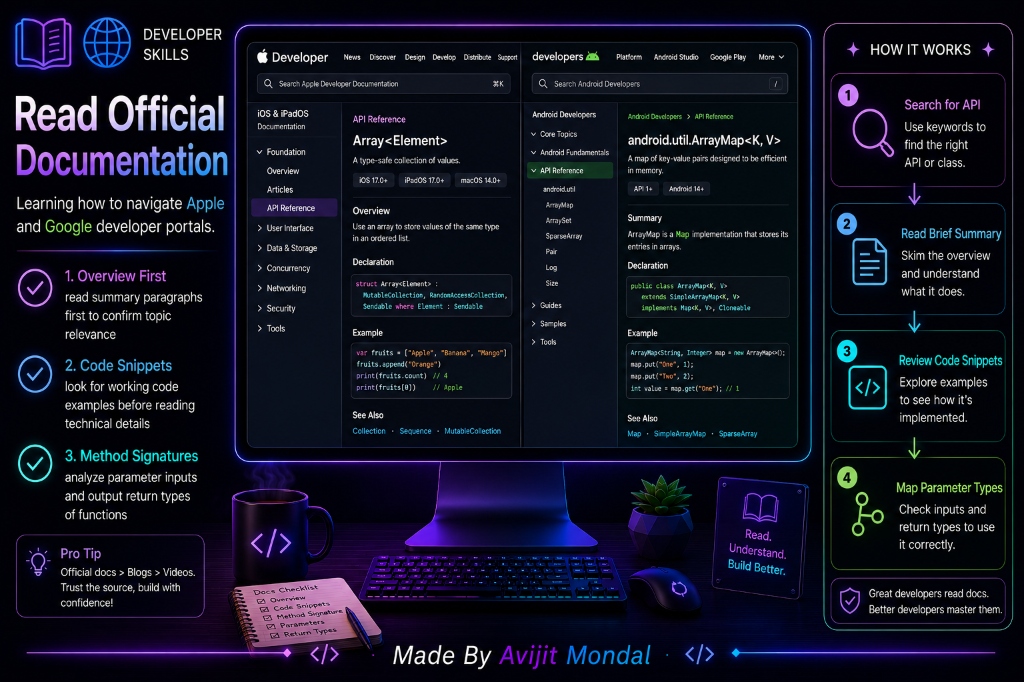
Introduction: When you start learning to code, you rely heavily on tutorials, videos, and beginner articles. But eventually, those tutorials run out. When you want to build a unique feature, use a newly released system API, or fix a rare bug, you must turn to the ultimate source of truth: the official Apple Developer Documentation (for iOS) or Android Developers portal (for Google). To a beginner, these sites can look like they are written in a foreign language. Let's see how to navigate and read official documentation without getting lost.
The Analogy: The Appliance User Manual
Imagine buying a complex new smart television for your home:
- You do not sit on the couch and read the entire 300-page user manual from cover to cover before turning the TV on. That would be boring and waste your time.
- Instead, you turn the TV on and play with the controls. When you want to connect a gaming console to the Bluetooth audio, you check the manual's index, go to the 'Bluetooth Settings' page, read the 3 steps, and close the booklet.
- If the screen shows a warning code 'E4', you flip to the troubleshooting page to find what 'E4' means and how to reset the power.
Developer documentation is that TV user manual. You use it as a reference tool to search for specific answers when you need them, not as a textbook to memorize.
3 Parts of a Documentation Page to Focus On
When you look at an official documentation page for a class or function (like URLSession or RoomDatabase), focus on these three sections:
- 1. The Summary Overview: Read the first 2-3 sentences at the top of the page. It explains the core purpose of the class. If it doesn't match your goal, hit the back button immediately to save time.
- 2. The Code Snippets: Do not read the massive list of 100 properties. Scroll down to look for example code blocks. Seeing a working example of how a class is initialized and called in code is the fastest way to understand how to use it.
- 3. The Function Signatures: Look at the inputs (parameters) and outputs (return types) of functions. If a method is declared as
func calculateTotal(prices: [Double]) -> Double, you know you must pass a list of decimals, and it will return a single decimal number.
Tutorials vs. Official Documentation
Compare using unofficial blog tutorials with reading official platform documentation:
| Aspect | Unofficial Blog Tutorials | Official Documentation (Apple / Google) |
|---|---|---|
| Code Accuracy | Can be outdated (doesn't compile on new OS) | ✅ Always up-to-date with the latest updates |
| Scope | Only covers the creator's specific app design | ✅ Covers every single setting and function available |
| Learning Style | Conversational, easy-to-read explanations | 🎯 Highly technical, concise, reference-focused |
| Best Used For | Learning a new concept from scratch | 🎯 Solving specific coding problems or utilizing new APIs |
Summary
Learning to read official Apple and Google documentation is a key step in a developer's growth. By treating documentation as a search reference rather than a textbook, focusing on the summary description, checking example code snippets first, and analyzing function inputs and outputs, you can master using official guides to build features and solve coding bugs independently!