
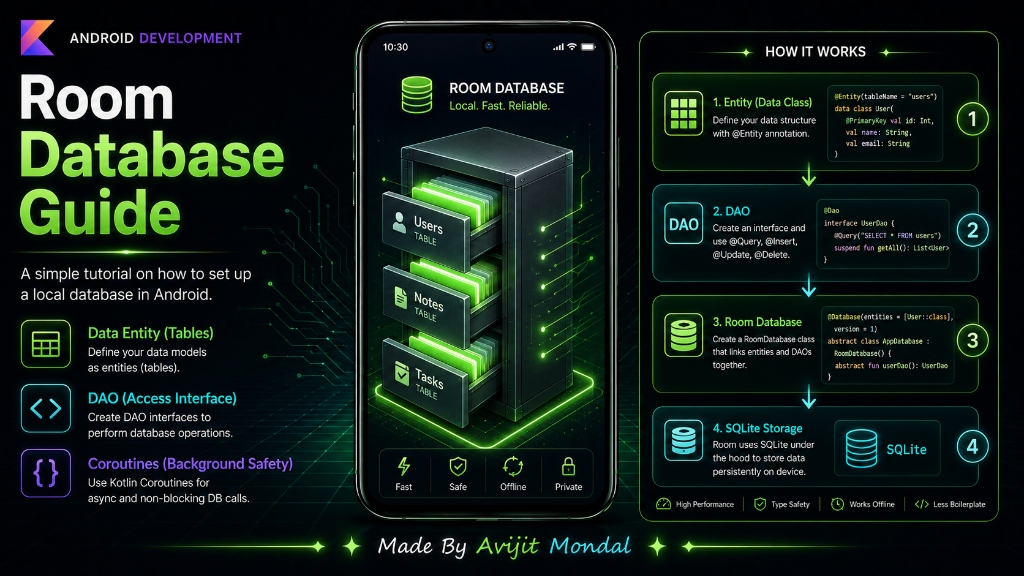
Introduction: If you are building an Android app that needs to work offline—like a notebook, a task tracker, or an offline catalog—you need to save data on the phone's hard drive. In Android, the best way to do this is using Room Database. It is a powerful, official library from Google that makes saving structured tables extremely easy.
The Analogy: The Smart Filing Office
Under the hood, Android uses a database system called **SQLite**. SQLite is like a raw warehouse floor. If you want to save something, you have to write raw database queries. If you make a typo in your text query, the system crashes.
Room is like hiring a **smart filing manager** to run the warehouse. You do not talk to the database floor directly. Instead, you write simple Kotlin code, and Room translates it into database actions automatically. Room has three main parts:
- 1. Entity (The Folder Template): The template that defines what a data record looks like (like a 'User' card with name and age fields).
- 2. DAO (Database Access Object - The Clerk): An interface that lists the actions you want to perform (like 'add user' or 'get all users').
- 3. Room Database (The Office): The main manager that holds the database file on the phone and connects the clerk with your folders.
Setting Up Room Database in Code
Let's see how easy it is to write these three parts in Kotlin code.
Step 1: Define the Entity (The Table)
We create a data class representing a table named User. We mark the primary key (the unique ID number) to auto-generate.
import androidx.room.Entity
import androidx.room.PrimaryKey

@Entity
data class User(
    @PrimaryKey(autoGenerate = true) val id: Int = 0,
    val name: String,
    val age: Int
)
Step 2: Define the DAO (The Clerk)
We create an interface showing what database actions are allowed. We use simple annotations like @Insert and @Query.
import androidx.room.Dao
import androidx.room.Insert
import androidx.room.Query

@Dao
interface UserDao {
    // Suspend means this runs in the background (using Coroutines)
    @Insert
    suspend fun insertUser(user: User)

    // Write a simple SQL query to load all users
    @Query("SELECT * FROM User")
    suspend fun getAllUsers(): List<User>
}
Step 3: Define the Database (The Office)
This class links your tables (entities) and your clerks (DAOs) together to initialize Room.
import androidx.room.Database
import androidx.room.RoomDatabase

@Database(entities = [User::class], version = 1)
abstract class AppDatabase : RoomDatabase() {
    abstract fun userDao(): UserDao
}suspend functions).Android Storage Options
To decide when to use Room, compare Android storage options in this table:
| Storage Type | Best For | Complexity | Access Speed |
|---|---|---|---|
| Shared Preferences | Simple values (Dark Mode flag, login tokens) | Very Easy | Fast |
| Internal Storage | Media files (images, audio clips) | Medium | Medium |
| Room Database | Large, structured tables (products, lists, profiles) | Medium | Fast & Secure |
Summary
Room Database is Google's modern library for storing local data in Android. It replaces raw SQLite queries with clean Kotlin annotations. By defining your Entities (tables), DAOs (access queries), and AppDatabase files, you can read and write data safely in the background using Kotlin Coroutines. Learn Room to build powerful offline-first apps!