
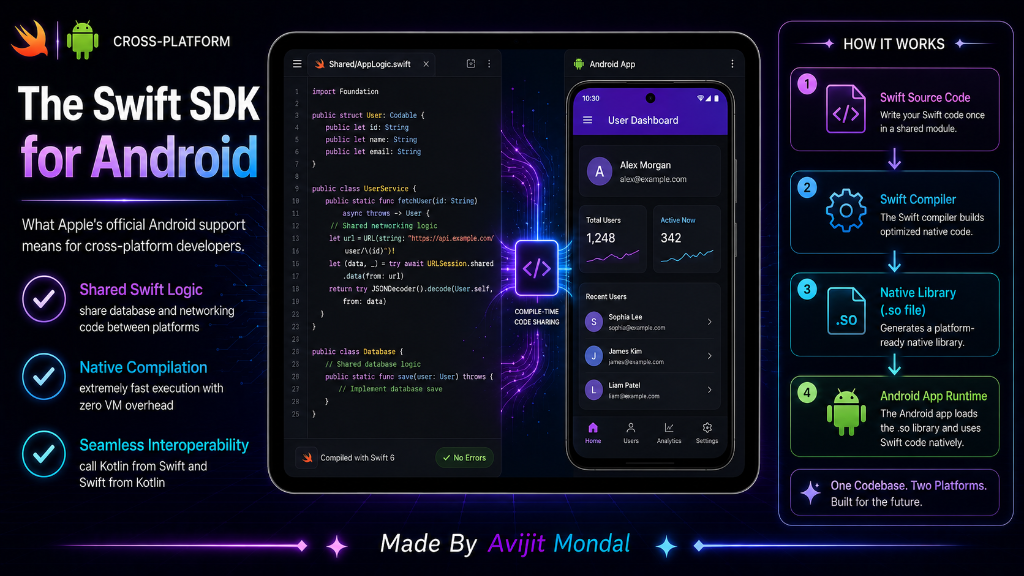
Introduction: For a long time, the rules of mobile development were simple: if you wanted to build an iPhone app, you wrote Swift; if you wanted to build an Android app, you wrote Kotlin. While cross-platform tools like Flutter or React Native existed, they required learning entirely different systems. But now, with the official Swift SDK for Android, developers can write native Swift code that runs directly on Android devices. Let's look at what this means for the future of app building.
The Analogy: The Universal Kitchen
Imagine you are an expert Italian chef who only knows how to use an Italian kitchen (iOS / Swift). Now, you are hired by a Japanese restaurant (Android) to cook there:
- The Old Way: You had to go to school to learn Japanese cooking styles, tools, and terminology (Kotlin / Android APIs) from scratch before you could make a single dish.
- The Swift SDK for Android Way: The Japanese restaurant installs a universal kitchen station that understands your Italian recipes. You can prepare your famous tomato sauces and pasta doughs (your core Swift logic) exactly how you always do, and the kitchen automatically plates it beautifully for the Japanese customers!
With the Swift SDK, your core app logic is written once in Swift and runs natively on both platforms.
What is the Swift SDK for Android?
The **Swift SDK for Android** is a collection of compiler tools that translates Swift code into the low-level machine code that Android devices run. It compiles directly to native binaries. This means that instead of rewriting your app's math, API calls, database code, and data models twice, you write them once in Swift and import them into both your iOS and Android projects.
Key Benefits for Developers
- Write Once, Run Everywhere (Logic): Share networking, calculations, and local databases between iOS and Android.
- True Native Performance: Because Swift compiles directly to native Android code, there is no virtual machine or web wrapper slowing it down. It runs as fast as Kotlin or C++.
- Easy Interoperability: Swift code can communicate directly with Android's Kotlin and Java code. You do not need to rewrite your entire app; you can just share the parts you want.
Swift for Android vs. Flutter vs. React Native
Here is how this new Swift-native approach compares to traditional cross-platform frameworks:
| Feature | Swift SDK for Android | Flutter | React Native |
|---|---|---|---|
| Language Used | Swift | Dart | JavaScript / TypeScript |
| UI Rendering | Native UI (SwiftUI / Jetpack Compose) | Custom Canvas (Skia / Impeller) | Native View Wrappers |
| Performance | 🚀 Native speed (No bridge/wrapper) | ⚡ High (compiled) | ⏳ Medium (JS bridge dependent) |
| Code Sharing | Shares logic only (UI is native) | Shares both UI and logic | Shares both UI and logic |
| Best Used For | Native performance with shared code | Consistent custom design everywhere | Web-like app development |
Summary
The Swift SDK for Android is a game-changer for mobile developers. It allows them to write core business logic, database code, and server requests once in Swift and run it natively on both iOS and Android. By combining shared Swift logic with native platform UI engines (SwiftUI and Jetpack Compose), developers can build high-performance, truly native cross-platform apps without learning secondary frameworks like Flutter or React Native!