
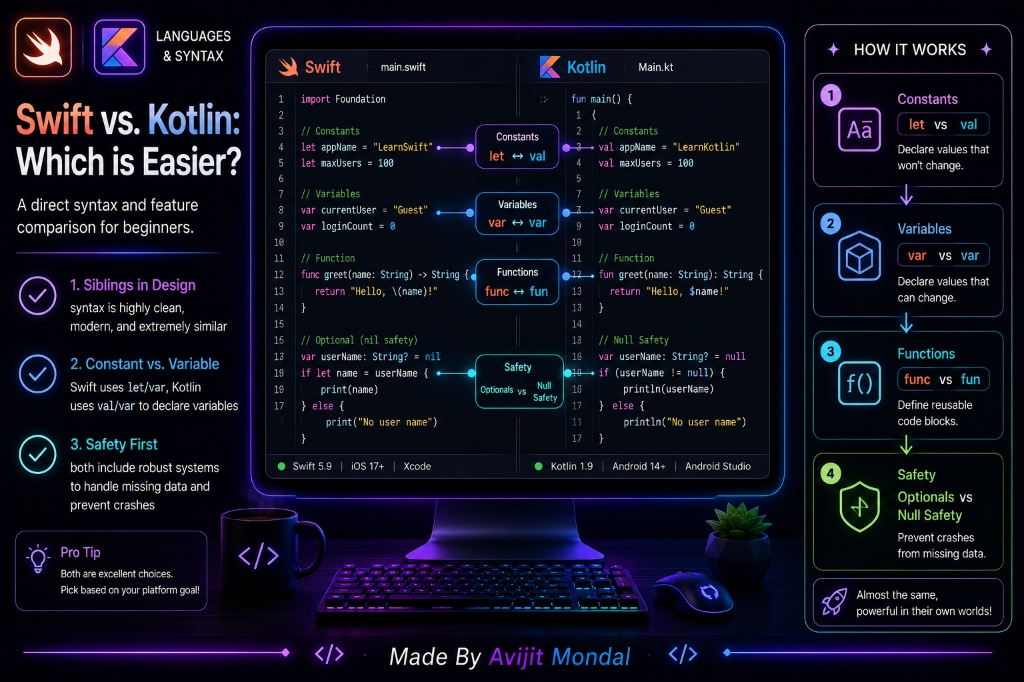
Introduction: If you want to start building mobile applications, you will inevitably have to choose between learning Swift (Apple's official language for iOS) and Kotlin (Google's official language for Android). Both are modern, safe, and powerful languages. But which one is easier for a complete beginner? Let's look at a direct syntax comparison to see how similar they are.
The Analogy: Two Modern Electric Cars
Compare Swift and Kotlin to driving two different modern electric cars:
- Both cars have keyless start, automatic lane guidance, regenerative brakes, and dashboard screens. They operate almost identically.
- One car might have the windshield wiper control on a stalk behind the wheel (Swift), while the other has it as a button on the dashboard (Kotlin).
- Once you learn how to drive one electric car, you can sit in the other and drive it safely with only a few minutes of adjustments.
Swift and Kotlin are like those two electric cars. Their design principles are so similar that if you learn one, learning the other takes very little effort.
Direct Syntax Comparison
Look at how close the syntax of Swift and Kotlin actually is when writing basic programming blocks:
- Declaring constants (cannot be changed):
Swift:let name = "Avijit"
Kotlin:val name = "Avijit" - Declaring variables (can be changed):
Swift:var count = 10
Kotlin:var count = 10 - Creating a string description:
Swift:"Hello, \(name)"(String Interpolation)
Kotlin:"Hello, $name"(String Template)
Here is how you write a basic function in both languages:
// Swift Function
func greet(user: String) -> String {
    return "Hello, \(user)"
}// Kotlin Function
fun greet(user: String): String {
return "Hello, $user"
}Key Differences: Optionals vs. Null Safety
The most important feature in both modern languages is preventing crashes when data is missing (null or nil). They handle this slightly differently:
- Swift Optionals: Swift wraps variables in a box called an Optional. You must safely unwrap the box using statements like
if letorguard letbefore reading the value. - Kotlin Null Safety: Kotlin builds null protection directly into the type system (e.g.
String?). It uses clean operators like the Elvis operator (?:) to provide backup values if data is null.
Swift vs. Kotlin: At a Glance
| Feature | Swift (iOS / macOS) | Kotlin (Android / Backend) |
|---|---|---|
| Constant Keyword | let | val |
| Variable Keyword | var | var |
| Null Handling | 🔒 Optionals (unwrap with guard/if-let) | 🔒 Null Safety types (Elvis operator ?:) |
| Primary Platform | Apple ecosystem only (macOS, iOS, watchOS) | Android, Server backend, multi-platform logic |
| Learning Ease | Easy (clean, English-like syntax) | Easy (clean, concise syntax) |
Summary
Neither Swift nor Kotlin is significantly easier than the other. Both languages represent the pinnacle of modern language design: they are clean, readable, type-safe, and compile down to high-performance native code. Choosing which language to study first depends entirely on whether you wish to target Apple iOS or Google Android mobile platforms!