
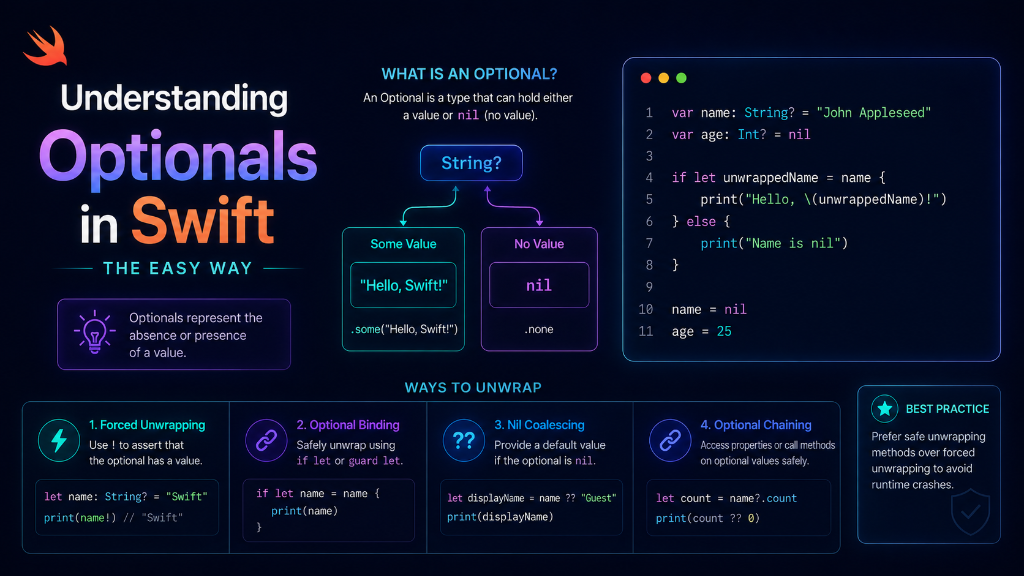
Introduction: When you start learning Swift, you will see question marks ? everywhere. These are called Optionals. They might look confusing, but they are very important. Let's understand them using a very simple story.
The Gift Box Analogy
Imagine you receive a wrapped gift box. What is inside?
- Option A: There is a beautiful toy watch inside the box.
- Option B: The box is completely empty (in Swift, we call this empty state nil).
In Swift, an Optional is exactly like this gift box. It is a box that might hold a value, or it might hold nothing at all.
How to Open the Box Safely (Unwrapping)
To safely use the value inside an optional, we must 'unwrap' it. Let's look at the three ways to do this in code.
Method 1: Safe check using 'if let'
This checks if the box has a value. If yes, it assigns it to a temporary variable and lets you use it safely.
let optionalGift: String? = "Toy Watch"

if let safeGift = optionalGift {
    print("Congratulations! You got a \(safeGift).")
} else {
    print("Sorry, the gift box is empty.")
}
Method 2: Force Unwrapping (DANGEROUS!)
You can force the box open using an exclamation mark !. This tells Swift: 'I am 100% sure the box is not empty, open it now!'
let emptyBox: String? = nil
// This will CRASH your app instantly because the box is empty!
let myGift = emptyBox!Method 3: Default Value using Nil-Coalescing (??)
This is a quick way to provide a backup value if the box is empty.
let optionalUserName: String? = nil
// If optionalUserName is nil, use "Guest"
let finalName = optionalUserName ?? "Guest"
print("Welcome, \(finalName)!")
Summary of Unwrapping Methods
| Method | Syntax | Is it Safe? | What happens if empty (nil)? |
|---|---|---|---|
| if let | if let value = optional | ✅ Safe | Runs the 'else' block |
| Nil-Coalescing | optional ?? default | ✅ Safe | Uses the fallback value |
| Force Unwrapping | optional! | ❌ Dangerous | Crashes the app immediately |
Summary
Optionals represent values that might be missing. Always open these boxes safely using if let or the default operator ??. Avoid using ! so your app never crashes for your users!