
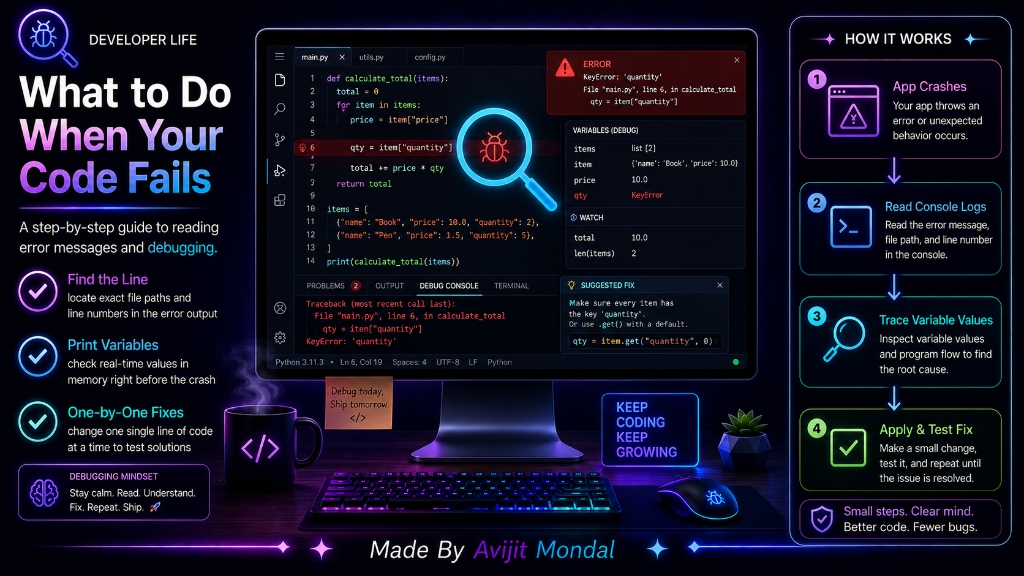
Introduction: Every single developer in the world—from a student on their first day of coding to a principal engineer at Google—writes code that does not run. Coding is essentially a process of writing code, watching it fail, and fixing it. The difference between a beginner and a professional programmer is not that the professional never makes mistakes; it is that the professional knows exactly how to read the error messages and debug the application. Let's look at a simple, step-by-step guide to finding and fixing code bugs.
The Analogy: The Warning Light vs. Kicking the Car
Imagine driving your car and it suddenly shudders and stops moving on the road:
- The Panic Response (Wrong Way): You get out, kick the tires, scream at the steering wheel, open the hood, and start randomly unplugging wires hoping it starts. It gets frustrating, wastes time, and might break other parts of the car.
- The Diagnostic Response (Right Way): You sit in the driver's seat and read the warning lights on the dashboard. The dashboard light tells you the engine is overheating. You open the hood, locate the coolant tank, see it is empty, refill it, and drive away safely.
Error messages in programming are those dashboard warning lights. Instead of panic-typing random code, you should read what the computer is telling you.
The 4-Step Debugging Process
When your code fails or crashes, follow this systematic approach to identify the problem:
- 1. Read the Error Message: Do not just close the terminal or log window. Look at the last lines of the output. Locate key terms and look for a file name and line number (e.g., Main.swift:24). Go directly to that line in your code editor.
- 2. Translate it into English: Technical error messages can sound scary, but they describe simple concepts. For example, 'Index out of bounds for length 3' simply means: 'You asked for item #5 in a list, but the list only contains 3 items.'
- 3. Verify Your Data (Print Debugging): Place print statements (like
print()in Swift orprintln()in Kotlin) right before the line that crashes to check what your variables actually contain. If you expect a username text but print revealsnilornull, you have found the bug! - 4. Make One Change at a Time: When trying to fix a bug, change only one line or variable, and run the code again. If you change five different blocks at once, you will have no idea which change fixed the bug, and you might accidentally add new errors.
Common Beginner Coding Errors Explained
Understanding these four common categories of errors will help you debug much faster:
| Error Type | Scary Technical Jargon | What It Actually Means |
|---|---|---|
| Null / Nil Pointer | NullPointerException / Unexpectedly found nil | 🤖 You tried to read or modify a variable that does not exist in memory yet. |
| Out of Range | IndexOutOfBoundsException / Array index out of range | 🤖 You tried to access an item index that is higher than the size of your list. |
| Syntax / Typos | Expected ';' or missing closing brace | 🤖 You made a grammar typo in your code, like forgetting a bracket or comma. |
| Logic / Semantic | No error message (but calculation is wrong) | 🤖 The code runs perfectly, but your math formula or conditional logic is incorrect. |
Summary
Debugging is the core skill of programming. When your code crashes, don't panic or change random lines. Follow a systematic process: find the line number of the crash, translate the technical error message into plain English, print variable values to see what is happening in memory, and test fixes one-by-one. Developing a strong debugging routine makes programming less stressful and helps you learn much faster!