Introduction: In late 2020, Apple made a massive announcement. They stopped using Intel processors in MacBooks and introduced their own Apple Silicon (M-series) chips, starting with the M1. Immediately, users noticed something incredible: MacBooks became incredibly fast, ran completely silent and cool, and had batteries that lasted for days instead of hours. Let's explain the hardware magic that makes these M-series chips so fast in very simple words.
The Analogy: The Scattered Workshop vs. The Universal Desk
To understand how Apple Silicon chips work, imagine you are a worker building a wooden toy:
- Traditional Intel PC (The Scattered Workshop): Your desk is in the center of the room. The wood materials (RAM memory) are stored down a long hallway. The painting tools (Graphics Card) are in a separate building across the street. Every time you need to paint a piece or get more wood, you have to walk, carrying the parts back and forth. You get tired, and the toy takes hours to finish.
- Apple Silicon (The Universal Desk): Your desk is custom-designed. Your wood materials, painting tools, and assembly tools are all built directly onto your desk within arm's reach. You do not have to walk or carry items down hallways. You build the toy instantly while sitting down, using almost zero wasted energy.
Apple Silicon is that Universal Desk. By packing all computer components onto one single chip, data does not waste time traveling.
The 4 Core Elements of Apple Silicon Speed
Apple Silicon M-series chips achieve their power through a combination of smart hardware design choices:
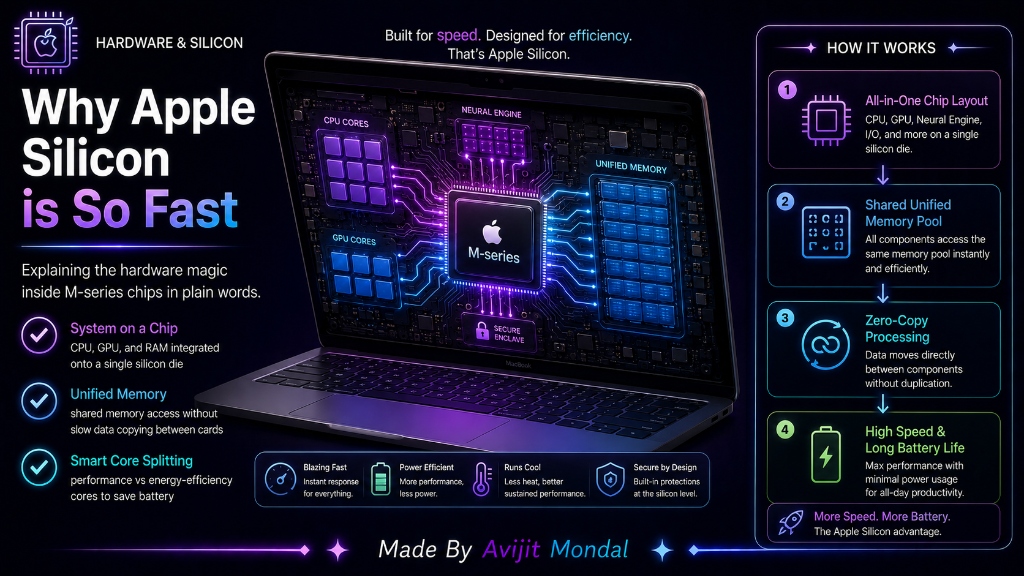
- 1. System on a Chip (SoC): Instead of having a separate CPU, graphics card, and RAM cards plugged into a big motherboard, Apple packs all of these onto a single, tiny piece of silicon. This reduces the distance data has to travel to almost zero.
- 2. Unified Memory Architecture (UMA): The CPU (processor), the GPU (graphics), and the Neural Engine (AI processor) share the exact same pool of memory. In old computers, the CPU had to copy data, send it over a cable to the graphics card, and wait. On M-chips, they all look at the same memory instantly without copying.
- 3. Performance vs. Efficiency Cores: The chips split the work. They have high-performance cores for heavy tasks like editing video or gaming, and energy-efficient cores for typing emails or surfing the web. This means your Mac uses very little battery for daily tasks.
- 4. Specialized Coprocessors: The chip has dedicated blocks for specific tasks—like a Neural Engine for AI, an Image Signal Processor for your webcam, and media engines to decode video files. These blocks do their jobs much faster than a general processor could.
Traditional PC vs. Apple Silicon (M-Series)
Compare how traditional computer setups match up against M-series chips:
| Feature | Traditional PC (Intel / AMD) | Apple Silicon (M-Series) |
|---|---|---|
| Hardware Layout | Separate parts connected via cables and motherboard | 🤖 System on a Chip (SoC) - all on one piece of silicon |
| Memory Handling | Copying data back and forth between CPU and GPU RAM | 🤖 Unified Memory - shared instantly without copying |
| Heat & Power | Runs hot; requires loud spinning fans to cool down | 🤖 Runs cool and quiet (many MacBooks have no fan at all) |
| AI Acceleration | Relies on standard CPU/GPU units (slower) | 🤖 Built-in Neural Engine (extremely fast local AI) |
Summary
Apple Silicon M-series chips achieve their remarkable speed and battery efficiency by integrating all computer parts—CPU, GPU, and RAM—onto a single System on a Chip (SoC). With a Unified Memory Architecture that allows different processing units to share data instantly without copying, combined with smart performance/efficiency core splitting, Apple Silicon delivers high performance while using only a fraction of the energy of traditional setups!